PawProof PicksPet gear that earns trust

Pet Cameras & Monitors

See Every Corner of the Room — Without Emptying Your Wallet

The Petcube Cam 360 gives you motorized 360° pan-and-tilt, crisp 1080p video, sharp night vision, and two-way audio for around $35. It's one of the most affordable full-room pet cameras on the market — but the best features live behind a subscription. Here's the honest breakdown.

As an Amazon Associate, PawProof Picks may earn from qualifying purchases. Always confirm current price and product details on Amazon.

Petcube Cam 360

Quick specs

Resolution1080p Full HD
Lens105° wide-angle, 350° horizontal / 55° vertical rotation
Zoom8x digital zoom
Night VisionInfrared, up to 30 ft
Two-Way AudioYes, full-duplex with built-in speaker and microphone
Connectivity2.4 GHz Wi-Fi only (no 5 GHz)
Smart HomeAmazon Alexa
Dimensions3.7 × 2.6 × 4.7 in (94 × 66 × 118 mm)
Weight10 oz (0.285 kg)
Privacy ModeYes — closed lens privacy mode
PowerPlug-in only (6 ft USB-C cable included)
Warranty1-year limited (2-year with Premium Care)

Why it stands out

Budget-conscious pet owners who want full-room 360° coverage with live streaming and two-way audio — and don't mind adding a subscription for clips and smart alerts

What sets the Cam 360 apart in real life is how fast and responsive the live feed is. Multiple reviewers noted that the Petcube app connects almost instantly — no 20-30 second wait that plagues competitors like Eufy. The pan-and-tilt joystick responds in near real-time with minimal lag, and the motorized rotation is whisper-quiet, so you won't startle a sleeping pet when you sweep the room. At this price point, that combination of speed, coverage, and discretion is genuinely hard to beat.

Best for

  • Budget-conscious pet owners who want full-room 360° coverage without spending $100+
  • Pet parents who primarily want live check-ins and two-way audio (free tier covers this)
  • Owners willing to add a Petcube Care subscription for clips and smart alerts
  • People who already use Amazon Alexa and want a camera that integrates with their smart home
  • Multi-pet households who need to scan a whole room from a single camera
  • Owners of senior or disabled pets who need reliable night vision monitoring

Pros

  • Excellent value — 360° pan/tilt, 1080p video, and night vision for ~$35
  • Fast, responsive live stream with near real-time pan/tilt controls
  • Impressively sharp infrared night vision rated to 30 ft
  • Compact, minimalist design that blends into any room
  • Quick 5-minute setup with guided app instructions
  • Whisper-quiet motorized rotation won't startle pets
  • Privacy mode with closed lens for when you're home
  • Two-way audio works on the free tier — no subscription needed
  • Strong customer service with fast email response times
  • 14-day free trial of Petcube Care lets you test premium features

Cons

  • No saved clips, video history, or smart alerts without a subscription
  • No automatic motion tracking — all pan/tilt is manual
  • 2.4 GHz Wi-Fi only — no 5 GHz support, can cause setup headaches
  • Known Android app bugs — recorded clips may not play back
  • Audio quality inconsistent — some report static, echoing, or low volume
  • 8x digital zoom gets noticeably fuzzy at maximum
  • No local storage option (no microSD slot)
  • App includes ads for Petcube products
  • No treat dispenser or pet-specific interactive features
  • Plug-in only — no battery option

What's in the Box and First Impressions

The Petcube Cam 360 arrives in a remarkably small box — a good sign for a camera that's meant to blend into your home. Inside, you'll find the camera unit, a 6-foot flat USB-C power cable (flattened specifically so the camera sits level while rotating), a power adapter, wall-mounting brackets with screws, 3M adhesive tape, and a quick start guide.

The camera itself is tiny: roughly 2.2 inches on each side and under 3 inches tall. It's a white-and-black cube with a motorized base that handles horizontal rotation and a secondary turret for vertical tilt. The design is clean and minimalist — the Petcube logo is subtle, and the whole unit disappears on a light-colored shelf. It feels well-made despite being plastic, and the non-slip rubber bottom keeps it planted on flat surfaces.

  • Camera unit with motorized 350° horizontal / 55° vertical rotation
  • 6 ft flat USB-C cable + power adapter
  • Wall-mounting brackets, screws, and 3M tape
  • Quick start guide

Setup: From Box to Live Feed in About 5 Minutes

Setup is genuinely simple. Download the Petcube app (iOS 14+ or Android 7.1.2+), plug in the camera, and the app walks you through the rest. You'll scan a QR code on the bottom of the camera with your phone, connect to your 2.4 GHz Wi-Fi network, and you should have a live feed within minutes.

One important note: the Cam 360 only supports 2.4 GHz Wi-Fi. If your router broadcasts both 2.4 GHz and 5 GHz under the same network name, you may need to temporarily separate the bands during setup. Several Amazon reviewers reported connectivity struggles tied to this — once connected, the camera generally stays online, but the initial pairing can be finicky on dual-band routers.

After setup, take a moment to check your framing on the live feed. Because the 105° lens is so wide, the edge of your shelf or table can dominate the frame. Petcube recommends placing the camera near the edge of the surface and about 3 feet off the ground for optimal coverage.

  • Download Petcube app → plug in camera → scan QR code → connect to 2.4 GHz Wi-Fi
  • Total setup time: approximately 5 minutes from unboxing to live feed
  • If your router uses a combined 2.4/5 GHz network name, temporarily separate the bands for smoother pairing
  • Position camera near the edge of a shelf, ~3 ft off the ground, for the best viewing angle

Video Quality: Clear by Day, Impressive by Night

Daytime footage at 1080p is crisp and colorful — easily sharp enough to read your pet's body language rather than squinting at a blurry blob. Petcube's own description of 'sharp 1080p HD live streaming video with a 105° wide-angle view for full-room coverage' is accurate, not marketing fluff. Multiple independent reviewers confirmed the video quality holds up well for the price.

The 8x digital zoom is useful for a quick closer look, but don't expect miracles — footage gets noticeably fuzzy at maximum zoom. It's fine for confirming 'is that my dog on the couch?' but not for reading fine details across a large room.

Night vision is where the Cam 360 genuinely punches above its weight. The infrared sensor delivers a clear, bright black-and-white image rated to 30 feet — enough to cover most indoor rooms comfortably. Reviewers specifically called out how sharp the night vision is, noting they could easily see their pet's outline and eyes in pitch darkness. Night vision switches on automatically when ambient light drops, and you can toggle it between Auto, Always On, or Always Off in the app settings.

Pan, Tilt, and Coverage: Manual but Smooth

The headline feature is the 360° rotation. Using virtual arrow buttons in the Petcube app's live feed, you can pan the camera left and right across a full 350° and tilt up and down across 55°. The motorized base moves smoothly and quietly — an important detail if you're checking on a sleeping pet and don't want to wake them.

The joystick controls come up immediately when you enter the live feed, with near real-time response. This is a meaningful advantage over competitors where pan/tilt controls are buried in menus or suffer from noticeable lag and overcorrection.

What you don't get is automatic motion tracking. The camera won't follow your pet on its own — you have to manually adjust the view. For a dog that mostly sleeps on the couch, this is fine. For a cat that roams the house, you'll be doing a lot of manual panning. Competitors like the Eufy E220 and Furbo 360 offer auto-tracking, but they cost more upfront.

  • 350° horizontal rotation + 55° vertical tilt — covers an entire room from one spot
  • Motorized movement is smooth and whisper-quiet
  • Joystick controls appear instantly in the live feed with minimal lag
  • No auto-tracking — all movement is manual via the app

Two-Way Audio: Talk to Your Pet in Real Time

The Cam 360 includes a built-in speaker and microphone for full-duplex two-way audio, meaning you can talk and listen simultaneously rather than push-to-talk style. The audio is clear enough to deliver commands, and reviewers noted less delay than on some competing cameras, including Petcube's own Bites 2 Lite.

That said, audio quality is a common complaint in Amazon reviews. Some owners report distortion, echoing, or static — particularly when there's background noise in the room. You can adjust both speaker volume and microphone sensitivity in the app's Video & Audio settings, which helps. If you're using two-way audio primarily to reassure an anxious pet, the quality is adequate. If you're expecting crystal-clear conversation, you'll be disappointed.

A small but thoughtful detail: the camera plays a sound alert when someone connects to the live stream, so your pet knows you're 'there.' You can disable this in settings if you prefer a stealthier check-in.

The Subscription Question: What's Free vs. What Costs Extra

This is the most important section on this page, so let's be direct. Out of the box, with no subscription, the Petcube Cam 360 gives you: live video streaming, two-way audio, manual pan/tilt, night vision, digital zoom, privacy mode, and the ability to take screenshots or manually record video while you're watching the live feed. That's it.

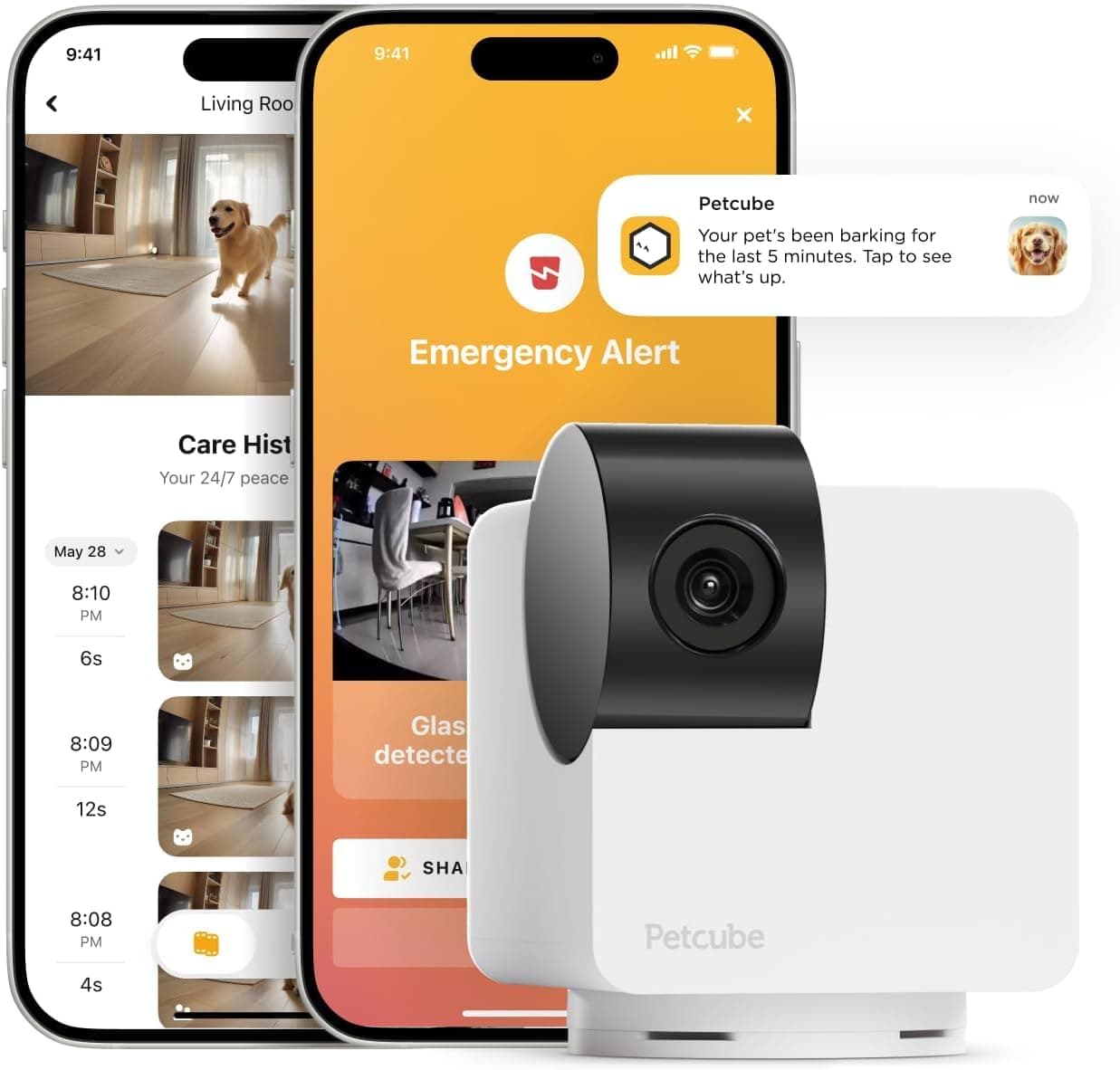
What you don't get without a subscription: saved video clips, video history, smart alerts (AI detection that distinguishes between pets, people, barks, and meows), the daily diary recap, smart filters, and web interface access. Without Petcube Care, if your dog barks at 2 PM while you're at work, you won't know about it and you won't have a clip to review.

Every new Petcube camera includes a 14-day free trial of Petcube Care, so you can test the premium features before committing. After that, there are two tiers.

  • Free tier: live streaming, two-way audio, manual pan/tilt, night vision, screenshots, manual recording while viewing
  • Optimal Care ($3.99/mo billed annually or $5.99/mo monthly): 3-day video history, 30-second clips, smart alerts, 10 video downloads/month, daily diary, web interface
  • Premium Care ($11.99/mo billed annually or $16.99/mo monthly): 90-day video history, unlimited video downloads, unlimited cameras covered, 2-year warranty, 24/7 online vet chat

How It Compares: Petcube Cam 360 vs. the Competition

The budget pet camera space is crowded, and the Cam 360 faces stiff competition from both pet-specific brands and general smart home cameras. Here's how it stacks up against the most relevant alternatives.

Against the Wyze Cam Pan v3 (~$40), the Petcube offers a similar 1080p resolution and pan/tilt coverage but loses on storage — Wyze includes a microSD card slot for free local recording, while Petcube requires a subscription for any saved footage. Wyze also supports both Alexa and Google Assistant, while Petcube is Alexa-only. However, Petcube's app is notably faster and more responsive for live streaming.

Against the Eufy E220 Indoor Cam (~$55), the Petcube is cheaper but outclassed on specs. Eufy offers 2K resolution (vs. 1080p), automatic motion tracking, a microSD slot for local storage, broader smart home compatibility (Alexa, Google Assistant, Siri), and a unique pet command feature that plays your recorded voice when it detects your pet on the furniture. For $20 more, Eufy is the stronger overall value — unless you specifically want the Petcube app ecosystem or the online vet chat feature.

Against the Furbo 360 Dog Camera (~$210), the Petcube is obviously the budget choice. Furbo adds treat tossing, auto-rotation tracking, and color night vision, but costs 5-6x more. If you want to interact with your pet remotely (treats, not just voice), Furbo is the category leader. If you just want to watch and talk, Petcube covers the basics at a fraction of the price.

Real-World Pet Parent Use Cases

Work-from-home check-ins: Place the Cam 360 in your living room and pan around during lunch breaks to see if your dog has moved from the couch to the bed (or the kitchen counter). The fast live-stream connection means you're not waiting 30 seconds for the feed to load.

Multi-pet households: If you have cats that roam, the 360° rotation lets you scan the entire room from one camera. Position it in a hallway and you can cover the landing, stairs, and front door area. For larger homes, Petcube offers multi-packs and the Premium Care plan covers unlimited cameras on one subscription.

Senior pet monitoring: Several Amazon reviewers specifically mentioned using the Cam 360 to monitor senior or disabled pets. The night vision is particularly valuable here — you can check on an older dog in a dark room without disturbing them.

Puppy cam / new adoption: If you're crate training or monitoring a new pet during the adjustment period, the Cam 360 gives you a full-room view so you can see if your puppy is sleeping, crying, or getting into something they shouldn't. Without the subscription, you'll need to actively check the live feed rather than getting alerts — but for short-term monitoring, that may be enough.

Common Complaints and Honest Concerns

We dug through hundreds of Amazon reviews and multiple expert reviews to surface the real, recurring complaints. Here's what pet owners consistently flag:

Connectivity issues are the most common complaint. A significant number of reviewers report the camera going offline, refusing to connect to Wi-Fi, or taking a long time to reconnect after a power blip. The 2.4 GHz-only limitation is a factor — if your router primarily broadcasts on 5 GHz, setup and stability can be frustrating. Petcube's troubleshooting guide addresses this, but it's a real friction point.

Audio quality is hit-or-miss. While some owners report clear two-way communication, others describe static, echoing, or distortion. The speaker volume is also lower than on Petcube's original Cam, according to one reviewer who owns both. Adjusting mic sensitivity and speaker volume in settings helps but doesn't fully resolve the issue for everyone.

Android app issues are a known problem. PCMag reported that recorded video clips would not play back on Android devices, and Petcube confirmed this is a known bug. Geofencing features also misfired on Android. If you're an Android user planning to subscribe to Petcube Care, test the 14-day free trial thoroughly before committing.

Subscription pressure is a frequent frustration. Without Care, the camera is essentially a live-only device. Several reviewers expressed disappointment that features they considered essential (clip recording, smart alerts) are locked behind a paywall. The app also includes ads for Petcube products, which some reviewers found tacky.

No auto-tracking means you'll be manually panning to follow a moving pet. If your pet is active and mobile during the day, this gets old fast. Competitors at similar price points (Eufy E220) offer auto-tracking.

On the positive side, customer service gets consistent praise. Multiple reviewers reported fast email responses — even on weekends — and hassle-free replacements for defective units. Petcube appears to stand behind their product when things go wrong.
How it compares

FeaturePetcube Cam 360Wyze Cam Pan v3Eufy E220 Indoor Cam
Price~$35~$40~$55
Resolution1080p HD1080p HD2K QHD
Pan/Tilt350° horizontal / 55° vertical (manual)360° horizontal / 93° vertical (manual)360° horizontal / 96° vertical (manual + auto-track)
Night VisionInfrared, up to 30 ft (B&W)Color + infrared, up to 30 ftInfrared, up to 32 ft
Two-Way AudioYes, full-duplexYesYes
Local StorageNoYes — microSD card slotYes — microSD card slot
Smart Alerts (pet/person)Subscription requiredFree (person detection)Free (pet & person detection)
Video History (free)No14-day rolling cloud clips (12 sec)Local via microSD
Auto-TrackingNoNoYes
Smart HomeAmazon AlexaAlexa + Google AssistantAlexa + Google Assistant + Siri
Subscription (entry)$3.99/mo (annual) or $5.99/mo$1.99–$3.49/mo (optional)$2.99/mo (optional)
Online Vet ChatYes (Premium tier)NoNo
Privacy ModeYes — closed lensYes — camera points downYes — camera points down

Free vs. subscription features

Included features

  • Live video streaming (1080p HD)
  • Two-way audio (talk and listen)
  • Manual 360° pan and tilt controls
  • Night vision (auto, on, or off)
  • 8x digital zoom
  • Screenshots from live feed
  • Manual video recording while viewing live feed
  • Privacy mode (closed lens)
  • Camera sharing with family and friends
  • 1-year limited warranty

Optional paid features

  • Optimal Care — $3.99/mo (billed annually at $47.88) or $5.99/mo: 3-day video history, 30-second clips, smart alerts (pet/person/bark/meow detection), 10 video downloads/month, daily diary recap, smart filters, web interface access
  • Premium Care — $11.99/mo (billed annually at $143.88) or $16.99/mo: Everything in Optimal plus 90-day video history, unlimited video downloads, unlimited cameras on one account, 2-year warranty, 24/7 online vet chat with licensed veterinarians
  • 14-day free trial included with every camera purchase
  • Note: Optimal plan covers one camera. Premium covers unlimited cameras on the account.

If you only want live check-ins and two-way audio, the free tier is sufficient. But the features that make a pet camera truly useful — saved clips when you're away, smart alerts that tell you 'your dog is barking' vs. 'something moved' — require a subscription. Budget for at least the Optimal plan ($47.88/year) when calculating your total cost. Without it, you're paying $35 for a live-only camera that can't tell you what happened while you were gone.

What buyers tend to mention

  • Praise: Crystal-clear picture quality for the price, especially daytime 1080p footage
  • Praise: Night vision is surprisingly sharp — can see pet outlines and eyes in pitch darkness
  • Praise: Setup is quick and straightforward, typically under 5 minutes
  • Praise: App is fast to connect and live feed loads almost instantly
  • Praise: Customer service is responsive, even on weekends, with hassle-free replacements
  • Praise: Compact, attractive design that doesn't look like a security camera
  • Complaint: Wi-Fi connectivity issues — camera goes offline, won't connect, or takes long to reconnect
  • Complaint: Audio quality is inconsistent — static, echoing, or low speaker volume
  • Complaint: No video recording or smart alerts without subscription — feels like essential features are paywalled
  • Complaint: Android app has bugs — recorded clips won't play back, geofencing misfires
  • Complaint: Camera sometimes stops working entirely after months of use
  • Complaint: App pushes Petcube product ads, which feels cheap for a paid device

Setup tips

  1. 1. Before purchasing, download the Petcube app and confirm it's compatible with your phone (iOS 14+ or Android 7.1.2+)
  2. 2. If your router broadcasts 2.4 GHz and 5 GHz under the same network name, temporarily separate the bands for setup — connect your phone to the 2.4 GHz network first
  3. 3. Place the camera near the edge of a shelf or table, about 3 feet off the ground, to avoid the surface edge dominating the wide-angle frame
  4. 4. Use the QR code on the bottom of the camera for fastest pairing — hold your phone steady about 6-8 inches from the lens
  5. 5. After setup, check your framing on the live feed and adjust position before finalizing placement
  6. 6. Take advantage of the 14-day Petcube Care free trial to test smart alerts and video history before deciding whether to subscribe
  7. 7. If the camera shows as 'offline' in the app, unplug and replug the power — the blue LED should turn solid when reconnected
  8. 8. Adjust motion and sound sensitivity in Settings → Notifications to reduce false alerts, especially if you have ceiling fans or busy windows nearby

Who should skip it

  • Anyone who wants recording and alerts without paying a monthly subscription — look at Wyze Cam Pan v3 or Eufy E220 instead
  • Pet owners who want auto-tracking (camera follows your pet automatically) — Eufy E220 or Furbo 360 do this
  • Households that only have 5 GHz Wi-Fi and can't or won't separate bands
  • Android users who need reliable video clip playback (known app bug)
  • Owners who want to toss treats remotely — Petcube Bites 2 Lite or Furbo 360 are better fits
  • Anyone needing outdoor or weatherproof coverage — this is indoor only

Questions before you buy

Does the Petcube Cam 360 require a subscription?

No, the camera works out of the box without a subscription. You get live streaming, two-way audio, manual pan/tilt, night vision, and screenshots for free. However, without a Petcube Care subscription, you won't get saved video clips, video history, or smart alerts. A 14-day free trial of Petcube Care is included with every purchase.

Can the Petcube Cam 360 record video without a subscription?

You can manually record video while you're watching the live feed in the app, and you can take screenshots. But the camera will not automatically record clips based on motion or sound detection without a Petcube Care subscription. There is no local storage (no microSD slot), so all saved clips are stored in the cloud via the subscription.

Does the Petcube Cam 360 track my pet automatically?

No. The pan and tilt are entirely manual — you control the camera's movement using arrow buttons in the Petcube app's live feed. The camera will not follow your pet on its own. Competitors like the Eufy E220 and Furbo 360 offer automatic motion tracking, but they cost more.

Does the Petcube Cam 360 work on 5 GHz Wi-Fi?

No. The Cam 360 only supports 2.4 GHz Wi-Fi. If your router broadcasts both 2.4 GHz and 5 GHz under the same network name, you may need to temporarily separate the bands during setup. The camera requires a minimum upload speed of 2 Mbps (4 Mbps recommended).

Does the Petcube Cam 360 dispense treats?

No. The Cam 360 is a camera-only device with no treat dispenser or laser pointer. If you want treat tossing, consider the Petcube Bites 2 Lite or the Furbo 360 Dog Camera. If you want a laser pointer for cats, look at the Petcube Play 2.

How long does setup take?

Most users report setup taking about 5 minutes from unboxing to live feed. Download the Petcube app, plug in the camera, scan the QR code on the bottom of the unit, connect to your 2.4 GHz Wi-Fi, and you're live. Some users with dual-band routers report taking longer due to Wi-Fi connectivity issues.

Can I share the camera with family members?

Yes. Through the Petcube app, you can share camera access with family and friends. Family members get near-full control (live feed, recorded videos with Care). Friend sharing allows scheduled access with configurable permissions. Anyone you share with needs to download the Petcube app.

What is the night vision range?

The infrared night vision is rated up to 30 feet (approximately 9 meters), which covers most indoor rooms. It switches on automatically when ambient light drops. You can also set it to Always On or Always Off in the app's Video & Audio settings.

Is the Petcube Cam 360 good for cats?

It can be, especially for cats that roam — the 360° rotation lets you scan an entire room. However, since there's no auto-tracking, you'll need to manually pan to follow a moving cat. For climbing cats, the 55° vertical tilt is useful for covering high shelves and cat trees. There's no laser pointer (that's on the Petcube Play 2).

What's the difference between Petcube Cam and Petcube Cam 360?

The Cam 360 adds motorized 350° horizontal and 55° vertical rotation, letting you pan and tilt remotely. The original Petcube Cam has a slightly wider 110° field of view but is a static camera — you can't move the lens remotely. All other features (1080p, night vision, two-way audio, 8x zoom) are the same.

Ready to See Every Corner of Your Pet's World?

The Petcube Cam 360 is the best budget 360° pet camera you can buy right now — if you understand what you're getting. For around $35, you get a compact, well-built camera with clear 1080p video, impressively sharp night vision, smooth and quiet motorized pan/tilt, reliable two-way audio, and an app that connects faster than cameras costing twice as much. As a live monitoring camera for quick check-ins on your pet, it's genuinely excellent value. The honest catch is the subscription. Without Petcube Care (from $3.99/month billed annually), there are no saved clips, no smart alerts, no video history, and no way to review what happened while you were away. The camera becomes a live-only device — you can watch and talk, but you can't catch the moment your dog stole food off the counter or your cat knocked something off a shelf. If you want the full pet camera experience, budget for at least the Optimal plan. Your first-year cost becomes roughly $83 ($35 camera + $48 annual subscription), which is still competitive with mid-range cameras that include local storage. If you're a pet parent who wants occasional live check-ins and doesn't need recorded clips, the Cam 360 at $35 with no subscription is a great deal. If you want alerts, clips, and video history without a monthly fee, look at the Wyze Cam Pan v3 or Eufy E220 instead. And if you want to interact with your pet remotely (treats, auto-tracking), the Furbo 360 is the category leader — but at 5-6x the price. The Petcube Cam 360 occupies a specific niche: affordable, full-room, live monitoring with the option to upgrade. For the right owner, it hits the sweet spot.

The Petcube Cam 360 gives you 360° coverage, 1080p video, night vision, and two-way audio for around $35. Check the current Amazon price below — it frequently goes on sale, and Prime shipping gets it to your door fast.

Check today's Amazon price