PawProof PicksPet gear that earns trust

Pet Cameras & Monitors

See Your Dog From Anywhere — and Toss Them a Treat While You're At It

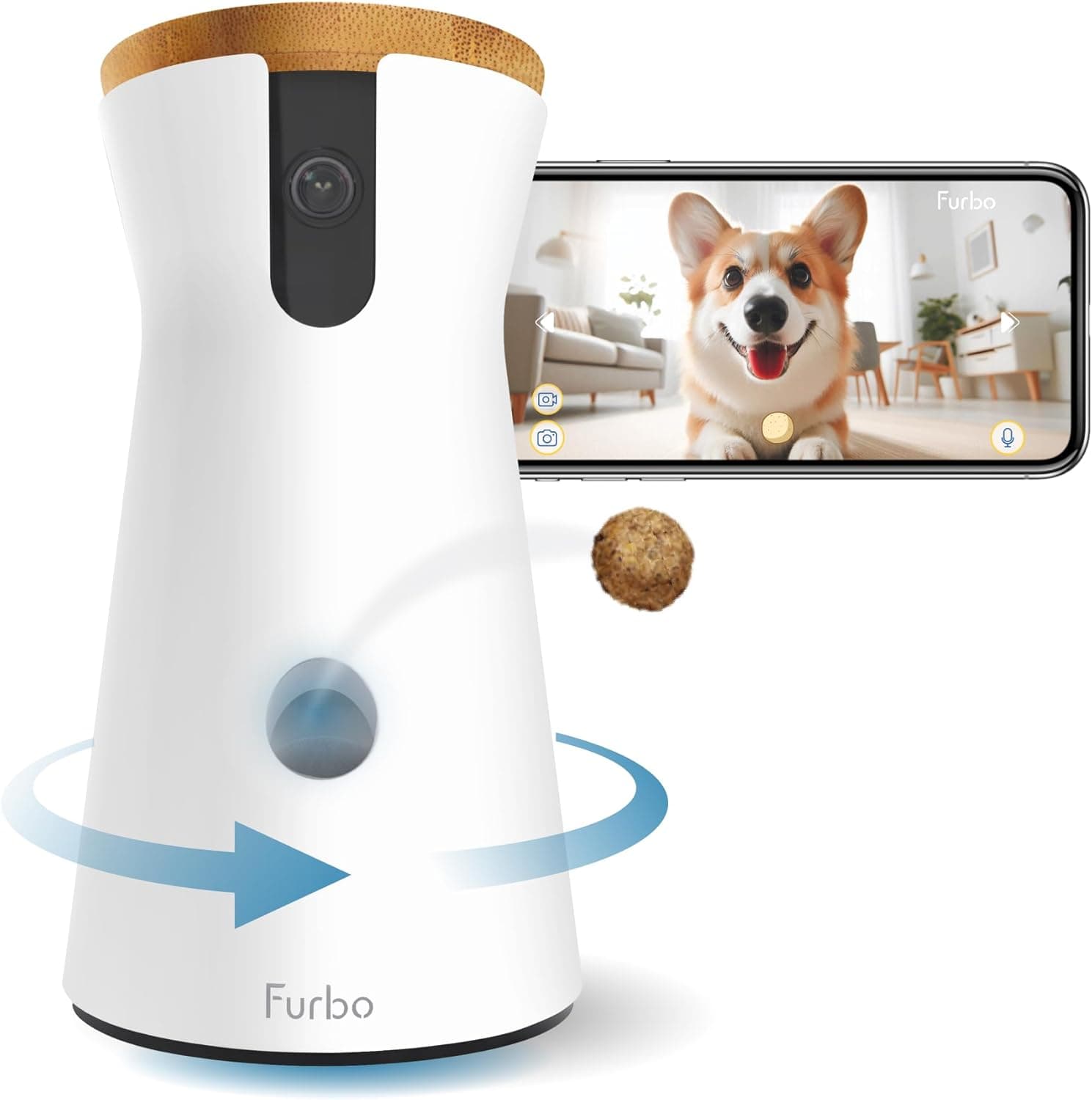
The Furbo 360° Dog Camera rotates a full 360 degrees to follow your dog around the room, dispenses treats on command, and sends free barking alerts straight to your phone. It's the most full-featured pet camera we've tested — but the subscription model and 2.4GHz Wi-Fi limitation are real trade-offs you need to understand before buying.

As an Amazon Associate, PawProof Picks may earn from qualifying purchases. Always confirm current price and product details on Amazon.

Furbo 360° Dog Camera

Quick specs

Resolution1080p Full HD (selectable: 1080p, 720p, 360p)
Field of View360° (160° wide-angle lens + 270° horizontal pan)
Zoom4x digital zoom
Night VisionColor + infrared (auto, always color, always B&W modes)
Two-Way AudioYes — built-in microphone and speaker
Treat CapacityApprox. 100 treats (dry, round, firm treats recommended)
Treat Size CompatibilitySmall (<0.5") or large (0.5"–0.75") — selectable in app
Connectivity2.4GHz Wi-Fi only, Bluetooth 4.2
Smart HomeAmazon Alexa (no Google Assistant support)
StorageCloud only (no local/microSD option)
PowerCorded electric, USB-C (5V/2A, 10W minimum). Adapter NOT included.
Dimensions8.78" H × 5.25" × 4.92" base
Weight1.7 lbs
Amazon Rating4.4/5 stars (6,000+ ratings)

Why it stands out

Dog owners who work outside the home and want to watch, talk to, and reward their dog remotely with full-room coverage

The 360° auto-tracking is the killer feature. Unlike fixed-lens pet cameras, the Furbo 360 physically rotates to follow your dog as they move around the room — silently enough that it won't startle a sleeping pup. Combined with treat tossing that rotates with the camera for better aim, it creates a level of remote interaction that feels less like surveillance and more like actually being there.

Best for

  • Dog owners who work outside the home and want to check in, interact, and reward their dog throughout the day
  • Pet parents of dogs with separation anxiety who benefit from hearing their owner's voice and receiving treats
  • Owners of active dogs who roam large rooms — the 360° tracking means you won't lose sight of them
  • Anyone who wants a pet-specific camera with treat tossing, not just a generic security cam pointed at the couch
  • Households where multiple family members want to check in (shared login supports up to 2 simultaneous viewers)
  • Crate training puppies — monitor behavior and reward calmness remotely

Pros

  • 360° rotation with silent motorized pan eliminates blind spots
  • Auto Dog Tracking follows your dog automatically — no manual searching
  • Treat tossing is genuinely fun and behaviorally useful for redirecting anxiety
  • Free barking alerts (no subscription required for basic notifications)
  • Color night vision is a meaningful upgrade over the original Furbo
  • Improved windmill treat mechanism with auto-troubleshooting for jams
  • Clean, attractive hourglass design with bamboo lid fits home decor
  • 4.4-star Amazon rating across 6,000+ reviews — strong real-world satisfaction
  • Works with Amazon Alexa for hands-free treat tossing
  • Includes 3M adhesive pads to prevent knock-overs by enthusiastic dogs

Cons

  • 2.4GHz Wi-Fi only — major connectivity issues with dual-band routers using band steering
  • No local storage — cloud recording requires a paid subscription
  • Free barking alerts trigger on any loud noise, not just barks (high false-positive rate)
  • No vertical tilt — camera pans left/right but not up/down
  • Power adapter NOT included in the box (must supply your own 5V/2A USB adapter)
  • No Google Assistant support
  • Alexa integration is unreliable according to many user reviews
  • No battery backup — camera goes offline during power outages
  • App pushes subscription upsells aggressively, especially in the first weeks
  • Customer service has a poor reputation for connectivity and hardware issues
  • Treat size is restrictive — only dry, round, firm treats work reliably

What Makes the Furbo 360° Different

The original Furbo Dog Camera was already a category leader — a treat-tossing camera with barking alerts and two-way audio. The Furbo 360° builds on that foundation with one game-changing upgrade: a rotating base that pans 270 degrees left and right, combining with the 160° wide-angle lens for a full 360° field of view.

That rotation isn't just for manual control. When you open the live feed, the camera's Auto Dog Tracking feature uses AI to identify your dog and physically rotate to keep them in frame as they move around the room. This is especially valuable for active dogs who don't stay in one spot, or for monitoring large, open living spaces where a fixed camera would leave blind spots.

Furbo also upgraded the treat dispenser. The new windmill-style mechanism is quieter than the original slingshot design, and you can now select between small and large treat sizes in the app to reduce jamming. An auto-troubleshooting feature can clear minor clogs on its own. The night vision also got a boost — you now get color night vision in low light (though it requires some ambient light; in total darkness, infrared black-and-white performs better).

  • 360° rotation via silent motorized pan (approximately 17°/second)
  • Auto Dog Tracking follows your dog automatically when live streaming
  • Color night vision in low light; infrared B&W in total darkness
  • Improved windmill treat tosser with small/large size selection
  • Free barking alerts — no subscription required
  • Works with Amazon Alexa for voice-activated treat tossing

What It's Actually Like to Use Day-to-Day

In real-world use, the Furbo 360° shines during those midday check-ins. You're at your desk, you open the app, and within seconds you're watching a crisp 1080p stream of your dog. If they've wandered off-screen, the camera has already rotated to follow them. You tap the mic button, say their name, and watch their ears perk up. Then you swipe up on the treat icon and a biscuit flies across the room.

The treat toss is the feature that dogs and owners both love most. It's not just a novelty — it's a genuine behavioral tool. If you spot your dog getting restless or pacing near the door, a well-timed treat and a few calming words through the two-way audio can redirect their attention before anxiety escalates. Multiple reviewers noted that the treat toss became part of their daily routine, not just a gimmick they used once.

The barking alerts are the other standout. When the camera detects loud noise, it pushes a notification to your phone (and Apple Watch). You tap it, the live feed opens, and you can assess the situation immediately. The catch: on the free tier, the barking sensor isn't truly bark-specific — it triggers on any loud noise. TV volume, a door slam, kitchen clatter, or a squeaky toy can all set it off. You can adjust sensitivity or disable it, but false alerts are a consistent complaint across thousands of reviews.

The Wi-Fi Situation: What You Need to Know Before Buying

This is the single most important thing to understand about the Furbo 360°: it only connects to 2.4GHz Wi-Fi networks. It does not support 5GHz. If you have a modern dual-band router that automatically steers devices between 2.4GHz and 5GHz (a feature called band steering), the Furbo may repeatedly disconnect when the router tries to assign it to a 5GHz band it can't use.

This isn't a minor issue — connectivity problems are the most common complaint in negative reviews, appearing in a significant portion of critical Amazon and Trustpilot feedback. Users describe the camera failing to connect 8 times out of 10, or dropping offline during the day when they need it most.

The fix is straightforward but requires some router comfort: create a dedicated 2.4GHz-only network name (SSID) in your router settings and connect the Furbo to that network exclusively. Before unboxing, log into your router, identify your 2.4GHz network name, and make sure your phone is connected to that same network when running the Furbo app setup. This single step prevents the majority of connectivity complaints. If you live in a dense apartment building with crowded 2.4GHz airwaves, or if your router is far from where you want to place the camera, consider a Wi-Fi extender.

  • 2.4GHz Wi-Fi only — no 5GHz support
  • Place within 15 feet of your router for best results
  • Create a dedicated 2.4GHz SSID if you have a dual-band router with band steering
  • Connect your phone to the same 2.4GHz network before running setup

Furbo Nanny Subscription: What's Free vs. What Costs Extra

Furbo's marketing says 'No Subscription Needed' — and that's technically true for the core experience. Without paying anything beyond the hardware cost, you get: live video streaming, two-way audio, treat tossing, barking alerts, night vision, manual pan control, auto dog tracking during live view, and the ability to take photos and record video manually while watching.

What you don't get for free: any kind of cloud video recording. If your dog does something interesting (or destructive) at 2 PM and you check the feed at 3 PM, there's no way to replay what happened. You only see what's happening right now. The free barking alerts also lack AI classification — they fire on any loud noise, not specifically barks.

Furbo Nanny is the optional subscription that unlocks the rest. Current pricing (as of 2025) includes a Standard plan at $9.99/month (or $7.99/month billed annually) and a Premium plan at $12.49/month (or $9.99/month billed annually). Every new Furbo includes a free trial (typically 14–30 days depending on region), so you can test the premium features before committing.

How It Compares to the Competition

The Furbo 360° doesn't exist in a vacuum. Two main competitors offer similar treat-tossing pet camera experiences, and each has distinct trade-offs worth understanding.

The Eufy Pet Dog Camera D605 ($199.99) is the closest spec-for-spec rival. It also pans 270°, has a 170° wide-angle lens, tosses treats, and offers auto dog tracking. Its biggest advantage: 16GB of built-in local storage, meaning you can record and review clips without any subscription. Its biggest drawback: no Alexa support and a bulkier design. If avoiding subscriptions is your top priority, the Eufy is the stronger choice.

The Petcube Bites 2 Lite (~$249) has a larger treat compartment (approximately 2 lbs vs. Furbo's ~100 treats), accepts a wider variety of treat sizes and shapes, includes a wall mount, and doubles as an Alexa device with 80,000+ skills. However, it has a fixed 160° lens with no panning or auto-tracking, and most smart alerts require a Petcube Care subscription. If treat flexibility and wall mounting matter more than 360° coverage, Petcube is worth considering.

Privacy and Security Considerations

Any internet-connected camera in your home deserves a privacy conversation. The Furbo 360° collects audio, video, and image data from your device, and Furbo's privacy policy acknowledges this. The app supports two-factor authentication — enable it. Use a strong, unique password for your Furbo account and your Wi-Fi network (and make sure they're different from each other).

If you subscribe to Furbo Nanny, you can schedule the camera to turn off during designated times (e.g., when you're home). Without a subscription, the camera must be turned off manually. There's no web interface — you can only access the camera through the mobile app, which means you can't quickly check in from a laptop or desktop browser.

There have been very few reported security incidents involving Furbo cameras, but the risk is never zero with any connected device. Positioning the camera thoughtfully (not pointed at sensitive areas), enabling 2FA, and keeping the camera off when you're home are the most effective precautions.

How it compares

FeatureFurbo 360° Dog CameraEufy Pet Camera D605Petcube Bites 2 Lite
Price~$184~$200~$249
Resolution1080p Full HD1080p HD1080p Full HD
Field of View360° (pan + wide-angle)270° pan, 170° lens160° fixed (no pan)
Auto Dog TrackingYes (free on live view)YesNo
Treat DispenserYes (~100 treats)YesYes (~2 lbs, varied sizes)
Treat Size FlexibilitySmall or large (selectable)0.24–0.60 inchesMultiple sizes/shapes
Night VisionColor + infraredInfraredInfrared
Two-Way AudioYesYesYes
Free Barking AlertsYesYesNo (requires subscription)
Local StorageNoYes (16GB built-in)No
Cloud RecordingWith subscription onlyLocal (no subscription needed)With subscription only
Alexa SupportYes (unreliable per reviews)NoYes (built-in Alexa device)
Google AssistantNoNoNo
Wall MountableNo (tabletop only)NoYes (included)
Subscription Required for Full FeaturesYesNoYes
Subscription PriceFrom $7.99/mo (annual)N/AFrom $5.49/mo (annual)
Amazon Rating4.4/5 (6,000+ reviews)4.1/5 (4,200+ reviews)4.3/5 (790+ reviews)

Free vs. subscription features

Included features

  • Live video streaming (1080p, 720p, or 360p)
  • Two-way audio (talk and listen)
  • Remote treat tossing (with custom sound option)
  • Barking alerts (push notifications — fires on any loud noise, not just barks)
  • Night vision (color + infrared, auto-switching)
  • Manual 360° pan control via app arrows
  • Auto Dog Tracking during live view
  • Take photos and manually record video while watching
  • Amazon Alexa voice control for treat tossing

Optional paid features

  • Cloud video history (3 days on Standard, 7 days on Premium)
  • Auto Pet Tracking for recorded video clips (not just live view)
  • Smart AI alerts: activity, selfie, continuous barking, crying, howling, chewing, potty
  • Person detection alerts
  • Home security alerts: CO/smoke alarm, glass breaking
  • Doggie Diary: daily 60-second highlight video of your dog's day
  • On/off scheduling (auto-privacy mode)
  • Calm My Pet: automated calming music for anxious dogs
  • AI Health Checker and Vet Report Translator (Premium)
  • Pet ID: multi-pet recognition (Standard and Premium)
  • Nanny Chat: AI pet care assistant
  • Daily activity and barking reports

The free tier covers the essentials — live view, treat tossing, two-way audio, and barking alerts. But without a subscription, you have zero video history. If your dog has an incident while you're away and you weren't watching live, there's no replay. For working dog parents who can't check in constantly, the subscription is practically necessary for peace of mind. Budget $96–$120/year on top of the hardware cost if you want the full experience. The free trial lets you test premium features before committing.

What buyers tend to mention

  • Dogs love the treat toss — many owners report their dog learned the sound within days and comes running
  • 360° rotation and auto-tracking are game-changers for monitoring large or open living spaces
  • Video quality in daylight is crisp and clear; night vision is adequate but not impressive in total darkness
  • Wi-Fi connectivity is the #1 pain point — users with dual-band routers frequently report disconnections and setup failures
  • Free barking alerts produce false positives from TV, kitchen noise, door slams, and squeaky toys
  • Subscription feels necessary for video history but adds meaningful ongoing cost to an already premium-priced camera
  • Setup is generally quick (under 15 minutes) when Wi-Fi cooperates, but can become a multi-hour ordeal when it doesn't
  • Customer service is a consistent negative theme — slow responses, chat-only support, and limited resolution options
  • Two-way audio quality is good but some users report the speaker isn't loud enough for their dog to hear clearly
  • The camera becomes part of daily routine — many long-term users say they can't imagine going back to not having it

Setup tips

  1. 1. Before unboxing: log into your router and identify your 2.4GHz network name and password. If your router uses band steering (combined 2.4/5GHz SSID), create a separate 2.4GHz-only network for the Furbo.
  2. 2. Place the camera 3–4 feet off the ground on a stable surface, within 15 feet of your Wi-Fi router, in an uncluttered area where the 360° rotation can be fully utilized.
  3. 3. Use the included 3M adhesive pads on the bottom to secure the camera if your dog is likely to investigate or knock it over.
  4. 4. Prepare a 5V/2A (10W minimum) USB power adapter — it is NOT included in the box. Furbo sells an official one, or any standard USB adapter meeting those specs works.
  5. 5. Connect your phone to the same 2.4GHz Wi-Fi network before opening the Furbo app. Enable Bluetooth on your phone for the initial pairing process.
  6. 6. Use only dry, firm, round treats (approximately 0.4" diameter works best). Avoid soft, moist, or irregularly shaped treats to prevent jamming. Select the correct treat size (small or large) in the app settings.
  7. 7. Set barking alert sensitivity to 'Medium' initially and adjust based on how many false alerts you receive. You can always lower sensitivity or disable alerts entirely.
  8. 8. Set night vision to 'Auto-Detection' mode — it automatically switches between color and infrared based on ambient light. 'Always in Color' won't work in total darkness.
  9. 9. Run through a full test before relying on the camera: check live stream over cellular data (not just Wi-Fi), test two-way audio, toss a treat, pan the camera 360°, and trigger a test alert.
  10. 10. Enable two-factor authentication in the Furbo app immediately after account creation for security.
  11. 11. Keep the original packaging for at least 90 days in case of hardware issues — Furbo's customer service reputation makes Amazon's return window your best safety net.

Who should skip it

  • Anyone with a 5GHz-primary mesh network who isn't comfortable creating a dedicated 2.4GHz SSID
  • Budget-conscious buyers who want full smart features without ongoing subscription costs (look at Eufy D605 instead)
  • Owners who only need passive monitoring — a $40 Wyze Cam or Tapo camera covers basic live view without treat tossing
  • Multi-pet households with cats — the treat lid isn't cat-proof and cats can break in and steal treats
  • Anyone who needs guaranteed uptime for a dog with a serious medical condition (connectivity drops are a real risk)
  • Smart home power users who rely on Google Assistant or need reliable Alexa integration

Questions before you buy

Does the Furbo 360° Dog Camera require a subscription?

No, the core features work without a subscription. You get live video streaming, two-way audio, treat tossing, barking alerts, night vision, 360° pan control, and auto dog tracking during live view for free. The Furbo Nanny subscription ($7.99–$12.49/month depending on plan and billing cycle) adds cloud video history, AI smart alerts, person detection, daily diary videos, scheduling, and other premium features. Every new Furbo includes a free trial so you can test premium features before deciding.

Why won't my Furbo 360° connect to Wi-Fi?

The most common cause is that the Furbo 360° only supports 2.4GHz Wi-Fi, not 5GHz. If you have a dual-band router with a combined network name, the router may try to assign the Furbo to a 5GHz band it can't use. The fix: create a dedicated 2.4GHz-only network name (SSID) in your router settings, connect your phone to that network, then run the Furbo app setup. Also ensure the camera is within 15 feet of your router and that Bluetooth is enabled on your phone for the initial pairing.

What treats work best with the Furbo 360°?

Use dry, firm, round treats with a diameter of approximately 0.4 inches for best results. The Furbo 360° supports two treat size settings in the app: small (under 0.5 inches) and large (0.5–0.75 inches). Avoid soft, moist, sticky, or irregularly shaped treats — these cause jamming. Many owners use their dog's regular kibble if it's the right size. The treat compartment holds approximately 100 treats.

Can multiple family members use the Furbo app?

Yes, but with limitations. Multiple devices can access the same Furbo camera by sharing a single Furbo account login. Family members cannot create separate accounts for the same camera. Up to two users can be connected to the live feed simultaneously.

Does the Furbo 360° work with Alexa or Google Assistant?

It works with Amazon Alexa — you can use voice commands to toss treats (e.g., 'Alexa, tell Furbo to toss a treat'). However, the Alexa integration has a poor reputation in user reviews, with frequent disconnection complaints. The Furbo 360° does not support Google Assistant.

Does the Furbo 360° have battery backup?

No. The camera is corded electric only and has no internal battery. If power is lost, the camera goes offline immediately. You'll need a continuous power connection via the included USB-C cable and a compatible 5V/2A adapter (not included in the box).

Can I use the Furbo 360° for cats?

The Furbo 360° is designed specifically for dogs. While some cat owners use it successfully, the treat lid is not cat-proof — cats have been known to break into the treat compartment. Furbo makes a separate Furbo 360° Cat Camera with a feather wand toy designed for feline interaction.

What's the difference between the Furbo 360° and the original Furbo?

The Furbo 360° adds a motorized rotating base for 360° room coverage (the original has a fixed 160° lens), color night vision (the original only has infrared B&W), an improved windmill treat tosser with size selection and auto-troubleshooting, and auto dog tracking. The original Furbo is cheaper (~$169) but lacks the panning capability that makes the 360° model stand out.

Is there a web interface or can I only use the mobile app?

There is no web interface. The Furbo 360° can only be accessed through the Furbo mobile app (iOS and Android). There's no way to view the camera feed from a laptop or desktop browser, which is a notable limitation if you want to check in from a computer at work.

Ready to See What Your Dog's Really Up To?

The Furbo 360° Dog Camera is the best pet camera we've tested for dog owners who want genuine remote interaction — not just passive monitoring. The 360° auto-tracking, treat tossing, two-way audio, and free barking alerts create an experience that no generic security camera or budget pet cam can replicate. If you work outside the home and your dog spends hours alone, this camera can meaningfully reduce both your anxiety and theirs. The 4.4-star Amazon rating across 6,000+ reviews reflects a product that genuinely works for the majority of buyers. That said, it's not the right choice for everyone. The 2.4GHz Wi-Fi limitation is a real issue that affects a significant minority of users, and if you're not comfortable adjusting router settings, it could become a frustrating experience. The subscription model — while optional for core features — is practically necessary if you want video history, and that adds $96–$120/year to the total cost of ownership. If you want a pet camera with no ongoing fees, the Eufy Pet Camera D605 with its built-in local storage is the better choice. Our recommendation: if you have stable 2.4GHz Wi-Fi, a dog who would benefit from midday interaction, and you're comfortable with either the free tier or budgeting for Furbo Nanny, the Furbo 360° is worth every penny. Buy through Amazon for the 30-day return window as a safety net, test it thoroughly during your first week, and take advantage of the free Furbo Nanny trial before deciding whether to subscribe. For the right household, it's one of those rare pet products that genuinely changes your daily routine — and your peace of mind.

The Furbo 360° Dog Camera gives you full-room coverage, treat tossing, two-way audio, and free barking alerts — everything you need to stay connected to your dog while you're away. Check the current price on Amazon and see if it's right for your home.

Check today's Amazon price