PawProof PicksPet gear that earns trust

Pet Cameras & Monitors

A Pet Camera That Actually Comes to You

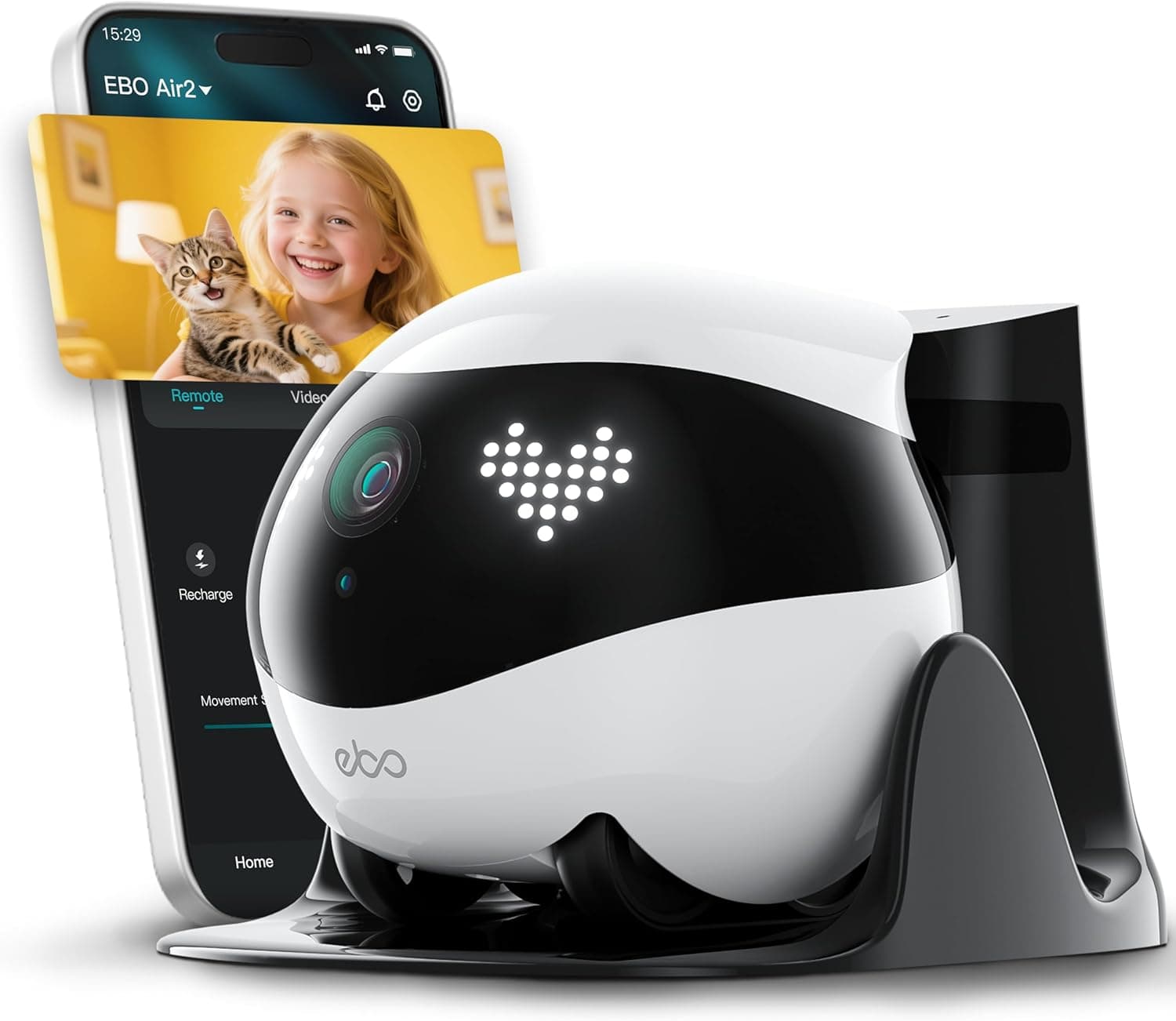
The Enabot EBO Air 2 isn't another stationary cam that stares at one corner of your living room. It's a palm-sized robot on treads that roams your home, streams 2K video, plays with your pets via laser and sound effects, and docks itself to recharge — all with no monthly subscription.

As an Amazon Associate, PawProof Picks may earn from qualifying purchases. Always confirm current price and product details on Amazon.

Enabot EBO Air 2 Pet Camera Robot

Quick specs

Resolution2K (2304 x 1296)
Field of View137° diagonal
Battery Life4–7 hours per charge
Charge Time2–3 hours
Storage32GB microSD included (up to 256GB)
ConnectivityDual-band 2.4GHz & 5GHz Wi-Fi
Weight282g (0.62 lbs)
Dimensions95 × 95 × 89.2mm
Obstacle ClearanceUp to 6mm; slopes up to 4°
Movement Speed20–55 cm/s (Steady & Sport modes)
ColorsDove White, Robin Pink, Jay Blue
Subscription RequiredNo — all core features free

Why it stands out

Pet owners who want a roving, interactive home monitoring robot that does more than a stationary camera

Unlike every stationary pet cam on the market, the EBO Air 2 physically drives to where your pet is. That means you can check under the bed, peek behind the couch, and follow your dog from room to room — all from your phone. The low floor-level camera angle is actually ideal for pet monitoring, giving you a perspective wall-mounted cameras simply can't.

Best for

  • Pet owners with mostly hard floors or low-pile carpet who want a camera that can actually find their pet
  • Cat owners whose cats are curious and playful — the laser pointer and movement patterns are designed for feline engagement
  • People who travel or work long shifts and want to actively interact with their pet mid-day, not just watch
  • Anyone who wants a pet camera with zero subscription fees and local-only storage
  • Households that want a secondary, roving camera to complement a fixed security setup
  • Pet parents of elderly or special-needs pets who need to check on them in different rooms throughout the day

Pros

  • Roving mobility — the only sub-$200 pet camera that physically drives to your pet
  • Sharp 2K resolution with 137° wide-angle lens and night vision
  • No subscription required — all features included, local storage only
  • 32GB microSD card included (expandable to 256GB)
  • Dual-band Wi-Fi (2.4GHz and 5GHz) — rare at this price
  • Laser pointer and sound effects for active pet play
  • Sturdy build — survived desk-height drops in multiple reviews
  • One-tap privacy mode and guest permission controls
  • Three color options to match your home
  • Two-way audio with AI noise cancellation for clear communication

Cons

  • Battery lasts 4–7 hours — not enough for full-day continuous monitoring
  • Auto-docking can be unreliable — may need manual docking via app
  • Struggles on high-pile carpet, thick rugs, and obstacles over 6mm
  • Video is shaky when the robot is moving (no stabilization)
  • No treat dispenser — a feature competitors offer at similar prices
  • Speaker is relatively quiet and can be drowned out by household noise
  • Initial Wi-Fi setup can be finicky — some users report disconnection errors requiring a reset
  • Pet reactions are unpredictable — some animals are scared of the robot
  • Floor-level camera angle limits effectiveness as a primary home security camera
  • Charging dock requires significant clear wall space (1–1.5m radius) for reliable auto-return

What the EBO Air 2 Actually Does

The EBO Air 2 is a small spherical robot — about the size of a grapefruit — that rolls around your home on rubber treads. You control it through the EBO Home app (iOS and Android) using tank-style directional controls, or you can trigger preset movement patterns like figure-eights and zig-zags designed for pet play.

The built-in 2K camera streams live video to your phone with a 137-degree wide-angle lens, so you get a broad view of whatever room the robot is in. IR-CUT night vision keeps footage visible after dark. When you're not actively driving it, you can set schedules for 24/7 recording, motion detection alerts, and 3-minute patrol routines that send the robot on a self-guided sweep.

For interaction, the EBO Air 2 includes a laser pointer (great for cats), pre-programmed sound effects (meows, purrs, duck quacks, and more), customizable LED eye expressions, and two-way audio with AI noise cancellation so your voice cuts through household noise. You can talk to your pet, play with them, and even snap photos or record video clips — all saved to the included 32GB microSD card.

  • 2K HD live streaming with 137° wide-angle lens and IR night vision
  • Remote-drive via app with Steady Mode (beginner) and Sport Mode (agile)
  • Laser pointer for cat play + sound effects and movement presets
  • Two-way audio with AI noise cancellation
  • Customizable LED eye expressions and clock display
  • Motion detection with push notifications and scheduled recording
  • Auto-recharge: robot navigates back to dock when battery is low
  • One-tap privacy mode disables camera and microphone
  • Multi-account device sharing with guest permission controls
  • Local storage only — no cloud subscription required

Real-World Performance: What Reviewers Found

Multiple hands-on reviewers from CNET, Phandroid, and CoventryLive tested the EBO Air 2 with their own pets and homes. The consensus: it's a genuinely fun, well-built device that shines as a pet companion but has real limitations you should know about before buying.

CNET's reviewer found the 2K video quality 'suitable for a 2K camera' when stationary — comparable to Ring's level — and noted the low floor angle is 'exceptional if you have pets.' However, video gets shaky when the robot is moving, especially on high-pile carpet. The robot handles hard floors and low-pile carpet well but struggles with thick rugs, transitions between flooring types, and obstacles over 6mm (it got stuck on an extension cord during testing).

Phandroid gave it a 7/10, praising the build quality and camera sharpness but flagging a fiddly initial setup with Wi-Fi disconnection errors that required a full reset to fix. The speaker was also noted as not very loud — it can be drowned out by household noise. CoventryLive's reviewer had a more positive experience, using it to monitor an elderly dog and successfully interacting with pets via two-way audio and the laser pointer.

One consistent theme across reviews: pet reactions vary wildly. Some cats and dogs are immediately curious and engaged; others are terrified of the robot's movement and sounds. The laser pointer worked for some pets but was completely ignored by others. This is a product where your individual pet's temperament matters a lot.

Battery Life and Charging: Plan Accordingly

The EBO Air 2 has a 2450mAh battery that Enabot rates for 4–7 hours of use. In practice, that means you won't get a full 8-hour workday of continuous roaming and streaming. If you're using it actively — driving around, playing with pets, recording — expect closer to 4 hours. If it's mostly idle with occasional check-ins, you'll stretch toward the higher end.

Charging takes 2–3 hours via the included dock. The robot is supposed to navigate back to the dock automatically using infrared guidance, but multiple reviewers found this process unreliable. CNET's reviewer noted the robot 'seemed to do well until the last second before wandering away,' and manually docking via the app was often faster. Enabot recommends leaving a 1–1.5 meter clear radius around the dock, which requires a fair amount of unobstructed wall space — not always realistic in smaller homes.

You can also set SmartCharge schedules through the app to ensure the robot docks at specific times, which is a practical workaround if auto-dock is inconsistent in your space.

Setup: What to Expect

Setup involves downloading the EBO Home app, creating an Enabot account, and connecting the robot to your Wi-Fi network. The EBO Air 2 supports both 2.4GHz and 5GHz bands, which is a nice touch — many pet cameras in this price range only support 2.4GHz.

However, several reviewers experienced initial Wi-Fi disconnection issues during setup. Phandroid's reviewer encountered 'constant disconnection errors despite following all the setup instructions step by step,' which were only resolved with a full factory reset. A quick search confirmed other users had similar problems. If you hit this, a reset appears to fix it — but it's worth knowing going in.

The printed manual covers basic setup only. For deeper feature exploration, Enabot points users to the 'Product Encyclopedia' in the app's Discovery tab, which walks through each capability. Plan to spend 20–30 minutes on initial setup and familiarization.

Privacy Features

Enabot built in several privacy controls that matter if you're placing a camera in your home. One-Tap Privacy Mode instantly disables both the camera and microphone — no video or audio is uploaded in this state. The app also shows a camera icon on the robot's LED display whenever recording is active, so anyone in the room knows they're being filmed.

Multi-level guest user permissions let you control who can access the camera feed and what they can do, with an access log tracking all user activity. All video is stored locally on the microSD card — there's no cloud storage, which means your footage never leaves your home network unless you choose to share it.

How It Compares to Stationary Pet Cameras

The EBO Air 2 occupies a unique niche. Most pet cameras in the $100–$200 range are stationary devices that sit on a table or shelf. The Furbo 360° Dog Camera ($164–$199) offers treat tossing and 360° rotation but can't physically move. The Petcube Bites 2 Lite ($70–$100) dispenses treats and has a wide-angle lens but is also fixed in place.

The EBO Air 2's mobility is its killer feature — and its main differentiator. No other consumer pet camera at this price can drive around your home, go under furniture, and follow your pet from room to room. The tradeoff: no treat dispenser, a battery that limits all-day monitoring, and video that's shakier than a fixed camera when in motion.

If treat tossing is your top priority, Furbo or Petcube is the better call. If you want to actually find and interact with your pet wherever they're hiding, the EBO Air 2 is the only option in this price range that does it.

How it compares

FeatureEBO Air 2Furbo 360° Dog CameraPetcube Bites 2 Lite
Price$199$164–$199$70–$100
Resolution2K (2304×1296)1080p HD1080p HD
MobilityYes — drives on treadsNo — 360° rotation onlyNo — stationary
Treat DispenserNoYes (up to 100 treats)Yes (up to 1.5 lbs)
Laser ToyYesNoNo
Two-Way AudioYes (AI noise cancellation)YesYes
Night VisionYes (IR-CUT)YesYes
Storage32GB microSD included (local)Cloud (subscription required)Cloud (subscription optional)
Subscription RequiredNoYes — for smart alerts & video history ($6.99/mo)No — but limited without Petcube Care ($5.99–$9.99/mo)
Wi-Fi2.4GHz & 5GHz2.4GHz only2.4GHz only
Battery PoweredYes (4–7 hrs, auto-recharge)No — plugged inNo — plugged in
Best ForRoving pet interaction & monitoringTreat-tossing dog monitoringBudget treat-tossing with alerts

Free vs. subscription features

Included features

  • Live 2K video streaming
  • Remote driving and movement controls
  • Two-way audio with AI noise cancellation
  • Laser pointer and pet-play sound effects
  • Motion detection with push notifications
  • Scheduled 24/7 recording and patrol routines
  • Local video storage on included 32GB microSD (expandable to 256GB)
  • Customizable LED expressions
  • Multi-account device sharing with guest permissions
  • One-tap privacy mode
  • SmartCharge scheduling

Optional paid features

  • No paid subscription exists for the EBO Air 2 — all features are included with purchase

This is one of the biggest selling points for the EBO Air 2. Unlike Furbo (which charges $6.99/month for smart alerts and video history) or Petcube (which charges $5.99–$9.99/month for cloud storage and AI alerts), the EBO Air 2 has zero recurring costs. Everything works out of the box with local storage. You'll never see a paywall for core features.

What buyers tend to mention

  • Build quality is consistently praised — the robot is sturdy and survived accidental drops
  • 2K camera quality is good when stationary, comparable to Ring-level security cameras
  • Setup and Wi-Fi connectivity issues are a recurring complaint, often resolved by a factory reset
  • Auto-docking is unreliable — multiple reviewers ended up manually docking the robot
  • Battery life of 4–7 hours is limiting for all-day monitoring; plan around charge cycles
  • Pet reactions vary dramatically — some pets love it, others are terrified
  • The laser pointer is hit-or-miss — some cats chase it, others completely ignore it
  • Speaker volume is low and can be hard to hear in noisy environments
  • Mobility on hard floors is smooth and enjoyable; high-pile carpet causes instability
  • The app is functional but could use more polish for a $200 device
  • No subscription requirement is a major positive — everything works out of the box
  • The low camera angle is excellent for pet monitoring but limits security-camera utility

Setup tips

  1. 1. Download the EBO Home app before unboxing — available on iOS App Store and Google Play
  2. 2. If you hit Wi-Fi disconnection errors during setup, do a full factory reset using the pin tool (included) and try again — this resolved the issue for multiple reviewers
  3. 3. Place the charging dock against a wall with at least 1–1.5 meters of clear space on all sides, away from mirrors and glass surfaces
  4. 4. Use the dock's adhesive pad to secure it to hard flooring — this prevents the robot from pushing the dock when approaching at an angle
  5. 5. Start in Steady Mode (beginner-friendly) before switching to Sport Mode for faster, more responsive driving
  6. 6. Explore the Product Encyclopedia in the app's Discovery tab — the printed manual only covers basic setup, and the app encyclopedia explains each feature in detail
  7. 7. Set up a SmartCharge schedule so the robot docks at predictable times (e.g., overnight) rather than relying solely on auto-dock
  8. 8. Test the laser pointer and sound effects with your pet while you're home before relying on them remotely — some pets need an acclimation period
  9. 9. If your home has mixed flooring, plan driving routes that avoid thick rug edges and cords — obstacles over 6mm will stop the robot

Who should skip it

  • Homes with mostly high-pile carpet, thick rugs, or lots of floor-level obstacles — the robot will struggle
  • Pet owners whose top priority is treat dispensing — Furbo or Petcube do this better
  • Anyone who needs 24/7 continuous monitoring without battery gaps — a plugged-in camera is more reliable
  • People with skittish pets who are easily frightened by moving objects and strange sounds
  • Those looking for a primary home security camera — the floor-level angle and battery limitations make it a poor fit
  • Budget-conscious shoppers who just want a basic pet cam — a $40–$50 stationary camera covers the essentials

Questions before you buy

Does the Enabot EBO Air 2 require a monthly subscription?

No. All core features — live streaming, remote driving, two-way audio, laser pointer, motion detection, scheduled recording, and local storage — work out of the box with no subscription. Video is stored locally on the included 32GB microSD card (expandable to 256GB). There is no cloud storage option and no paid tier.

How long does the battery last?

Enabot rates the 2450mAh battery for 4–7 hours of use, depending on how actively you're driving and streaming. Expect closer to 4 hours with continuous active use and toward 7 hours with mostly idle monitoring. Charging takes 2–3 hours via the included dock.

Can the EBO Air 2 climb stairs or go over thresholds?

No. The EBO Air 2 can handle obstacles up to 6mm high and slopes up to 4 degrees. It cannot climb stairs or navigate significant thresholds. It's designed for single-level homes or one-floor monitoring at a time.

Does it work on carpet?

It works well on hard floors (wood, tile, laminate) and low-pile carpet. On high-pile carpet, the video becomes unstable and the robot's center of gravity can cause it to wobble. Thick rug edges can also cause issues. If your home is mostly carpeted, this may not be the best fit.

Can the EBO Air 2 dispense treats?

No. The EBO Air 2 does not have a treat dispenser. Its pet interaction features are the laser pointer, sound effects, movement patterns, and two-way audio. If treat tossing is important to you, consider the Furbo 360° or Petcube Bites 2 Lite instead.

Is the EBO Air 2 good for home security?

It can function as a secondary security camera, but it's not ideal as a primary one. The floor-level camera angle limits what you can see (furniture blocks views, and facial features are hard to capture up close), and the battery means it can't monitor 24/7 without charging gaps. CNET's reviewer concluded it's 'more of a pet camera than a full-fledged security camera.'

What's the difference between the EBO Air 2 and the EBO Air 2 Plus?

The EBO Air 2 Plus ($400) upgrades nearly every feature: full-color screen eyes (vs. LED dot-matrix), better maneuverability, improved camera, and a full AI suite including an assistant, pet tracking, and advanced patrolling. The standard EBO Air 2 ($199) is the better entry point for new buyers and still includes the laser pointer and all core pet-interaction features.

Can multiple people in my household use the app?

Yes. The EBO Air 2 supports multi-account device sharing with customizable guest permissions and an access log. You can control what each user is allowed to do and see a record of all activity.

What happens to my video footage?

All video and photos are stored locally on the microSD card inside the robot. There is no cloud storage, so your footage never leaves your home network unless you manually download it to your phone or computer. You can back up files by removing the SD card or transferring via the app.

Will my pet be scared of it?

It depends on your pet. Multiple reviewers reported mixed reactions — some cats and dogs were immediately curious and engaged, while others were frightened by the robot's movement and sounds. There's no way to predict your pet's reaction with certainty. If your pet is easily startled by moving objects or strange noises, consider whether a quieter stationary camera might be a better fit.

Ready to Roll? Get Your EBO Air 2

The Enabot EBO Air 2 is the most interactive pet camera you can buy for under $200 — if your home and your pet are the right fit. It's not a replacement for a dedicated security camera, and it won't toss treats like a Furbo. What it does is something no stationary camera can: it goes to your pet. You can drive it under the bed to find your hiding cat, roll it into the kitchen to check on your dog, and play with them via laser and sound from your desk at work. For pet parents who want active engagement, not passive watching, that's a genuinely different value proposition. The tradeoffs are real. Battery life caps at 4–7 hours, so you'll need to plan around charging cycles. Auto-docking is inconsistent. The robot struggles on thick carpet. And your pet might love it or might run from it — there's no way to know until you try. The no-subscription model is a significant advantage over Furbo and Petcube, which nickel-and-dime you for alerts and video history. Over two years, that $6.99/month Furbo subscription adds up to $168 — nearly the cost of the EBO Air 2 itself. If you have hard floors, a curious pet, and want a camera that's as much a companion as a monitor, the EBO Air 2 is worth the $199. If you just want to watch your pet sleep on the couch while you're at work, save your money and get a $40 stationary cam. This is a product for people who want to show up for their pets remotely — not just watch.

The Enabot EBO Air 2 ships with the robot, charging dock, 32GB microSD card, and everything you need to start monitoring and playing with your pet from day one — no subscription, no hidden fees. Check the current price on Amazon and see which color fits your home.

Check today's Amazon price